
The 2024 Wimbledon men's final finished 6–2, 6–2, 7–6(4). That score is a useful summary. It does not tell you that the opening game alone contained five break-point opportunities.
A set score compresses the route into the destination. With game-level data, we can show where the server faced trouble, which of those games ended in a hold, and how a tiebreak belongs on the timeline without pretending it is an ordinary service game.
Let's turn that final into a pressure map.
Disclosure: I maintain CrawlPlant's tennis Actors. The illustration comes from a saved historical source feed parsed with the same parser used by the Actor. It is not a newly executed live request.
Run this project: Get the code, sample data and finished outputs on GitHub. To fetch your own data, use the live recipe and follow the .env setup guide to add your APIFY_TOKEN. Actor calls can incur charges; the setup explains per-run limits.
Fetch the match in the right format
Install apify-client and set APIFY_TOKEN. The helper checks run status and reads every returned dataset page. The call can incur Apify charges; this example requests one known match with room below the result cap.
import os
import json
import math
from pathlib import Path

def call_actor(slug, run_input):
    from apify_client import ApifyClient

    client = ApifyClient(os.environ["APIFY_TOKEN"])
    run = client.actor(f"crawlplant/{slug}").call(run_input=run_input)
    if not run or run["status"] != "SUCCEEDED":
        raise RuntimeError(f"Actor did not succeed: {run and run['status']}")
    rows = list(client.dataset(run["defaultDatasetId"]).iterate_items())
    if len(rows) >= run_input["maxItems"]:
        raise RuntimeError("Result reached maxItems; narrow the range or increase the cap before claiming completeness.")
    return rows
rows = call_actor("tennis-point-by-point", {
    "mode": "matchIds",
    "matchIds": ["Sf0bExdB"],
    "pointByPointFormat": "games",
    "maxItems": 10,
})
if len(rows) != 1 or rows[0].get("matchId") != "Sf0bExdB":
    raise ValueError("Expected the selected Wimbledon final")
match = rows[0]
The format matters. This Actor can also return a compact Sackmann-style point stream. Here we want a pointByPoint array with explicit game, server, winner and pressure fields, so the input asks for games.
The historic fixture contains 29 entries: 28 ordinary games and one tiebreak. The first game has server: "player2", winner: "player1", and breakPoints: 5. In this match that means Djokovic served, Alcaraz won the game, and five break-point opportunities occurred.
Count opportunities and games separately
A game with five break points is one pressure game and five opportunities. Those are different denominators. The following function selects ordinary service games that contained at least one break point:
def pressure_games(match):
    games = match.get("pointByPoint")
    if not games:
        raise ValueError("No game-level points; select pointByPointFormat='games' and check coverage")
    result = []
    for game in games:
        if game.get("tiebreak") or game.get("server") not in ("player1", "player2"):
            continue
        if game.get("winner") not in ("player1", "player2"):
            continue
        faced = game.get("breakPoints")
        if faced is None or faced < 1:
            continue
        result.append({"set": game["set"], "game": game["game"], "server": game["server"],
                       "opportunities": faced, "held": game["winner"] == game["server"]})
    return result
pressure = pressure_games(match)
for game in pressure:
    print(f"Set {game['set']}, game {game['game']}",
          match[f"{game['server']}Name"],
          game["opportunities"], "held" if game["held"] else "broken")
There are nine such games in the recorded final. A zero means that no break-point opportunities were marked in an available game. An unavailable game is a coverage issue and should not be added as a zero.
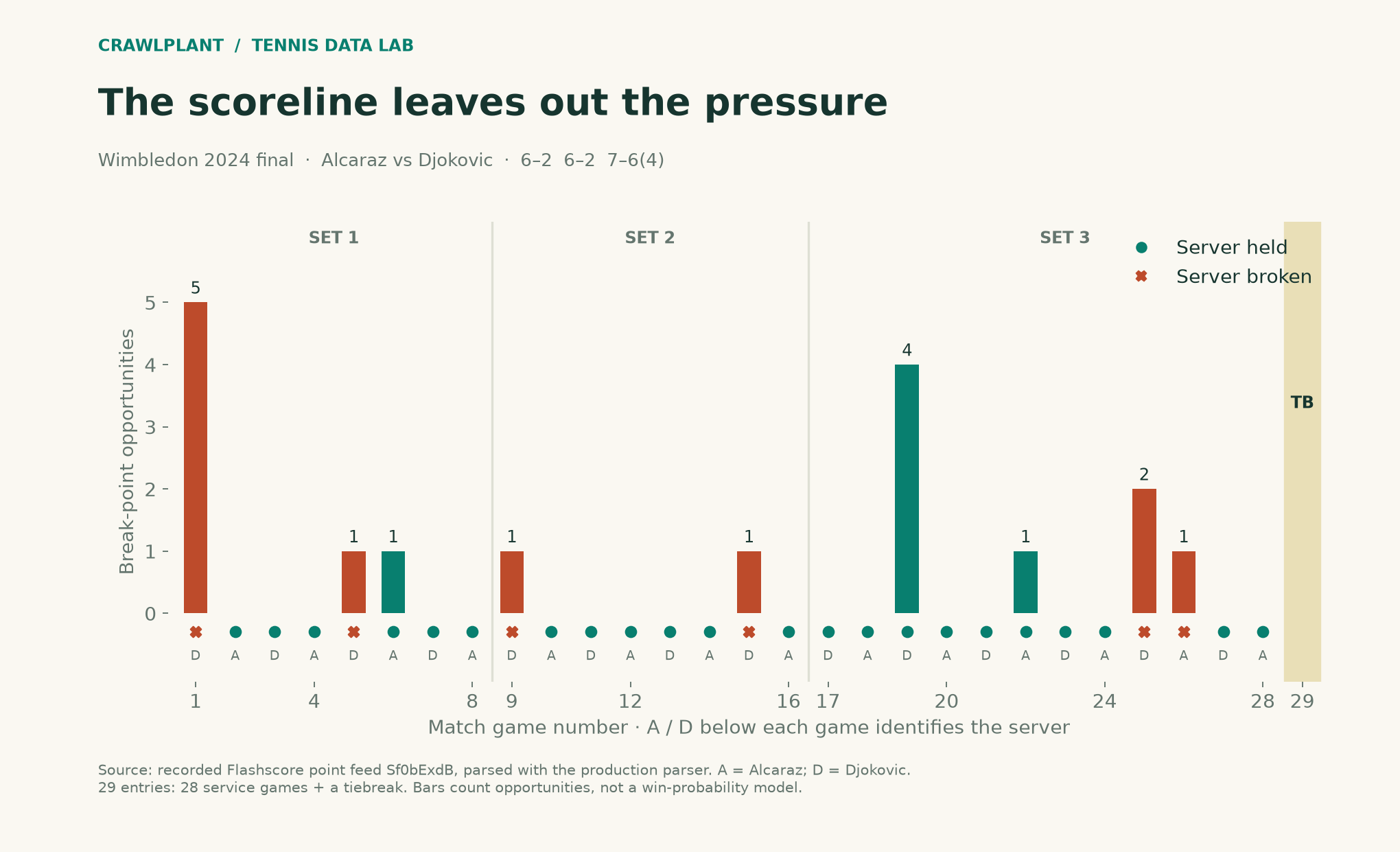
Dots show whether the server held or was broken; vertical bars count break-point opportunities. The tiebreak is shaded separately. The chart deliberately does not put a win-probability scale on the score progression: that would require a point-level model, not just drawing the score differently.
A small plot of your own
The following produces the opportunity bars for the selected pressure games. The companion asset adds the full 29-entry game timeline and set separators.
import matplotlib.pyplot as plt

labels = [f"{g['set']}.{g['game']}" for g in pressure]
colours = ["#0b8a78" if g["held"] else "#d15c32" for g in pressure]
fig, ax = plt.subplots(figsize=(11, 4))
ax.bar(labels, [g["opportunities"] for g in pressure], color=colours)
ax.set(xlabel="Set.game", ylabel="Break-point opportunities",
       title="Wimbledon 2024 final: service games under pressure")
ax.set_ylim(bottom=0)
fig.tight_layout()
fig.savefig("pressure.png", dpi=180)
Holding a game after facing break point is an observable event. Calling that player “more clutch” would be a much larger claim. You would need many matches, opponent and surface context, and an explicit baseline before making it.
Start from history instead of a famous final
The same workflow can begin with Tennis Match History: retrieve a player's matches, select a few close completed finals, and pass those matchId values to Tennis Point-by-Point. Restricting the deeper fetch to a shortlist makes both the analysis and the cost easier to inspect.
For a larger project, start with the match dataset to define the cohort, then report the fraction for which points are available. Historical point coverage is not guaranteed for every match. Missing points must stay visible in the methodology.
This is where the Actors fit together: the table identifies a match worth asking about, history explains its context, and point-by-point lets the reader see what the final score left out.
Reproduce the complete illustrated timeline
The companion includes the full renderer for the illustration above, not only the short bar-chart example. It reads all 29 game entries, marks holds and breaks, draws set boundaries, labels each server and shades the tiebreak separately. Outputs: assets/03-wimbledon-pressure.png and .svg.
The saved fixture produces 28 ordinary games, nine pressure games and 17 break-point opportunities, plus the tiebreak. The source data is included, so the five opportunities in the opening game can be checked directly.
Download and reproduce the example
Download the offline companion ZIP. Extract it, open a terminal in that folder and run:
python -m pip install -r requirements.txt
python render.py
The package includes the dated sample data, calculation functions, complete chart renderers and finished reports. It generates the series' charts and reports together; no API token or paid Actor/model call is required. The live-fetch code earlier in this article is a separate option and can produce different counts.
Inspect the sources: chart renderer, AI charts, report generation, and data notes. Both PNG and SVG outputs are written to assets/; reports go to reports/.
Keep building: Browse all 48 runnable examples, including Python, JavaScript and AI workflows across the CrawlPlant Actors.
Built with CrawlPlant's tennis Actors. Examples use dated source snapshots; fresh runs can return different results.
Explore the complete series →