
A tennis notebook can be perfectly reproducible and quietly out of date. It still loads a CSV, still draws a chart, and still answers a question about a season that ended months ago.
I wanted the same convenient workflow with a fresh source: one row per match, winner and loser columns, rankings, serve statistics and pre-match Elo. Then I wanted to do something a static season file cannot do on its own: pick an interesting match and open its point-by-point history.
This tutorial starts with the first half: an updating local match dataset. The last section shows how it connects to deeper analysis.
Disclosure: I build and maintain the CrawlPlant Actors used here. This is an independent dataset in the column layout associated with Jeff Sackmann's tennis files; it is not his dataset or an affiliated project.
Run this project: Get the code, sample data and finished outputs on GitHub. To fetch your own data, use the live recipe and follow the .env setup guide to add your APIFY_TOKEN. Actor calls can incur charges; the setup explains per-run limits.
Start with a small, inspectable batch
Install the Python API client and pandas:
pip install apify-client pandas
Set APIFY_TOKEN in your environment. The helper below starts a run, checks its status, and retrieves the dataset through the client's paginated iterator. Calling it can incur Apify charges; begin with a small date range and set a spending limit in your Apify run settings.
import os
import json
import math
from pathlib import Path

def call_actor(slug, run_input):
    from apify_client import ApifyClient

    client = ApifyClient(os.environ["APIFY_TOKEN"])
    run = client.actor(f"crawlplant/{slug}").call(run_input=run_input)
    if not run or run["status"] != "SUCCEEDED":
        raise RuntimeError(f"Actor did not succeed: {run and run['status']}")
    rows = list(client.dataset(run["defaultDatasetId"]).iterate_items())
    if len(rows) >= run_input["maxItems"]:
        raise RuntimeError("Result reached maxItems; narrow the range or increase the cap before claiming completeness.")
    return rows
Fetch a completed calendar week rather than an unfinished day. The dataset Actor uses winner_* and loser_* fields, while the other Actors generally use player1 and player2.
rows = call_actor("tennis-match-dataset", {
    "years": [],
    "dateFrom": "2026-10-12",
    "dateTo": "2026-10-18",
    "tours": ["atp", "wta"],
    "maxItems": 2000,
})

import pandas as pd
df = pd.DataFrame(rows)
print(df[["tourney_name", "winner_name", "loser_name", "score"]].head())
For a whole season, use years: [2025] instead of the date window and increase maxItems. A result at the cap is not proof that you downloaded the season; the helper deliberately stops you from making that assumption.
Update by identity, not by row number
An overlapping window is useful. It gives recently corrected scores or statistics another chance to reach your local copy. Appending every batch would turn those corrections into duplicate matches.
Use match_id as the key and let the new record replace the old one:
def update_dataset(old_rows, new_rows):
    # Refresh an overlap window: corrected rows replace the same match id.
    by_id = {}
    for row in [*old_rows, *new_rows]:
        key = row.get("match_id")
        if not key:
            raise ValueError("A match_id is required for an update")
        by_id[key] = row
    return list(by_id.values())
Write the result through a temporary file so an interrupted write does not overwrite your existing snapshot with half a JSON document:
def write_snapshot(path, rows):
    path = Path(path)
    temporary = path.with_suffix(path.suffix + ".tmp")
    temporary.write_text(json.dumps(rows, ensure_ascii=False, indent=2), encoding="utf-8")
    temporary.replace(path)
from pathlib import Path
import json

path = Path("tennis-matches.json")
old_rows = json.loads(path.read_text(encoding="utf-8")) if path.exists() else []
updated = update_dataset(old_rows, rows)
write_snapshot(path, updated)
pd.DataFrame(updated).to_csv("tennis-matches.csv", index=False)
The JSON file is the update source; the CSV is a convenient export. Schedule an overlapping fetch once a week. A seven-day overlap does not catch a correction to a match from six months ago: occasionally refresh an older season if historical revisions matter to your work.
Ask a question the table can actually answer
Here is a useful first chart: how often did the lower-ranked player win in this particular batch?
ranked = df.dropna(subset=["winner_rank", "loser_rank"]).copy()
ranked = ranked[~ranked["score"].fillna("").str.contains(r"RET|W/O|DEF")]
ranked = ranked[ranked["winner_rank"] != ranked["loser_rank"]]
ranked["lower_ranked_winner"] = ranked["winner_rank"] > ranked["loser_rank"]
summary = ranked.groupby("tour")["lower_ranked_winner"].agg(["sum", "count", "mean"])
print(summary)
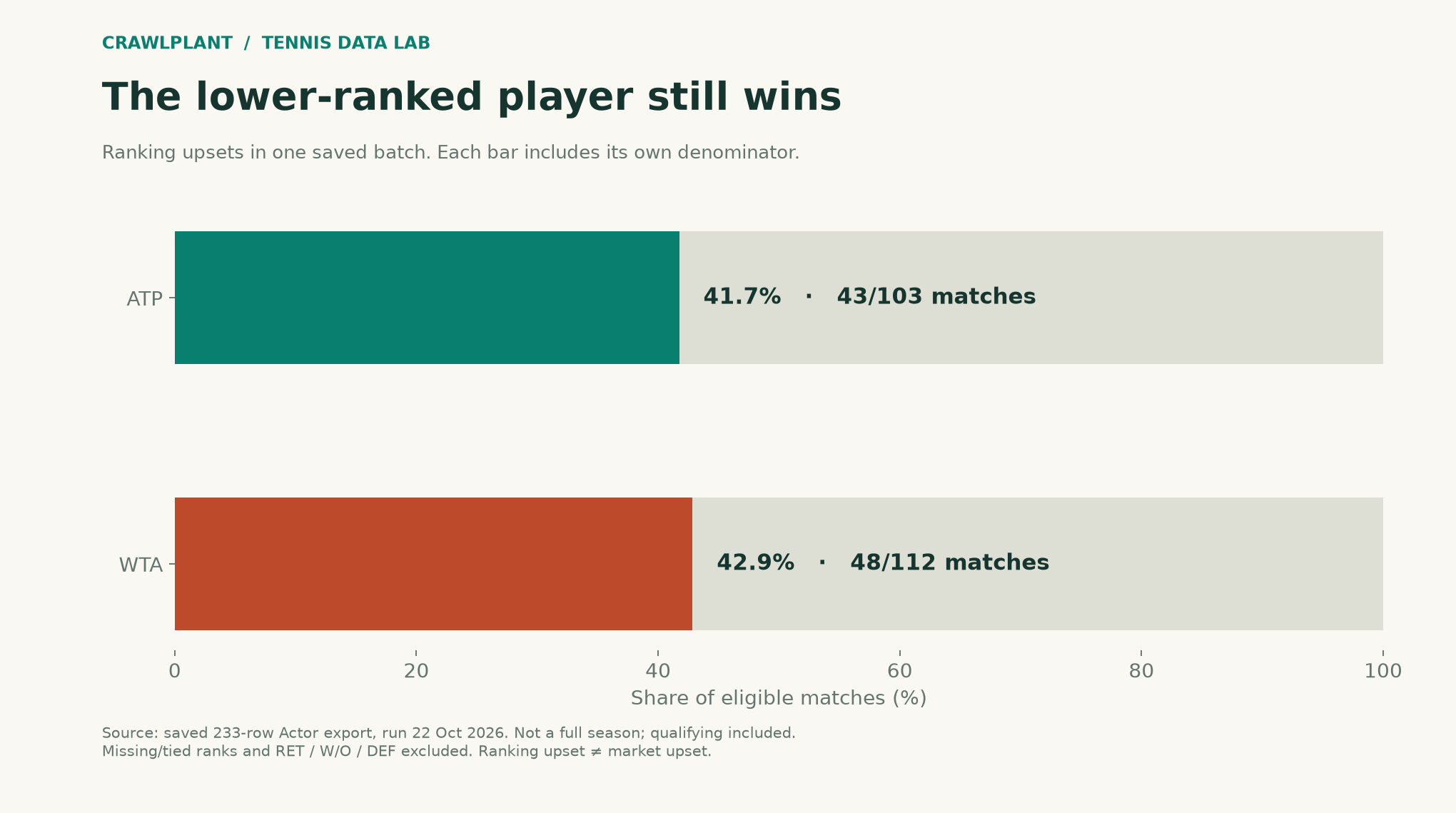
The illustration uses a saved 233-row Actor result from October 22, 2026. Its tournament-week labels span October 5–19; it was not produced by the fixed calendar-week request above. It is an example batch, not an estimate for the full tour. The chart excludes missing or tied ranks and retirement, walkover and default scores. Qualifying matches remain included. A ranking upset also does not necessarily mean a market upset.
Zoom into the matches that caught your attention
The column layout becomes more useful when the row is a starting point. match_id can be passed to Tennis Point-by-Point as matchIds. winner_id and loser_id can be matched to the player objects returned by Tennis Match History.
Keep the identity convention clear: these are Flashscore identifiers. They are not interchangeable with the numeric player identifiers in Sackmann's original files. The column names are familiar; that does not make every field or tournament-level convention identical.
Start with ATP & WTA Tennis Match Dataset, inspect one batch, and only then schedule it. The useful milestone is a notebook that stays current without quietly multiplying its rows.
Watch an overlapping update replace a row
This deliberately stale local value demonstrates the update rule; it is not a claim that the source corrected this match:
stale = {**rows[0], "score": "DEMO OLD VALUE"}
refreshed = update_dataset([stale], [rows[0]])
assert len(refreshed) == 1
assert refreshed[0]["score"] == rows[0]["score"]
print(stale["match_id"], stale["score"], "->", refreshed[0]["score"])
One identity remains one row. The companion saves the before/after records in reports/update-demo.json and regenerates the exact ranking-upset chart as assets/01-rank-upsets.png and .svg.
Download and reproduce the example
Download the offline companion ZIP. Extract it, open a terminal in that folder and run:
python -m pip install -r requirements.txt
python render.py
The package includes the dated sample data, calculation functions, complete chart renderers and finished reports. It generates the series' charts and reports together; no API token or paid Actor/model call is required. The live-fetch code earlier in this article is a separate option and can produce different counts.
Inspect the sources: chart renderer, AI charts, report generation, and data notes. Both PNG and SVG outputs are written to assets/; reports go to reports/.
Keep building: Browse all 48 runnable examples, including Python, JavaScript and AI workflows across the CrawlPlant Actors.
Built with CrawlPlant's tennis Actors. Examples use dated source snapshots; fresh runs can return different results.
Explore the complete series →