
The most interesting tennis analysis often starts wide and ends narrow. Which matches deserve attention? What had the players been doing before them? Where, inside one match, did the score become difficult to hold?
Those questions need different levels of detail. Downloading every field for every match is an expensive way to discover that you only wanted to inspect three of them.
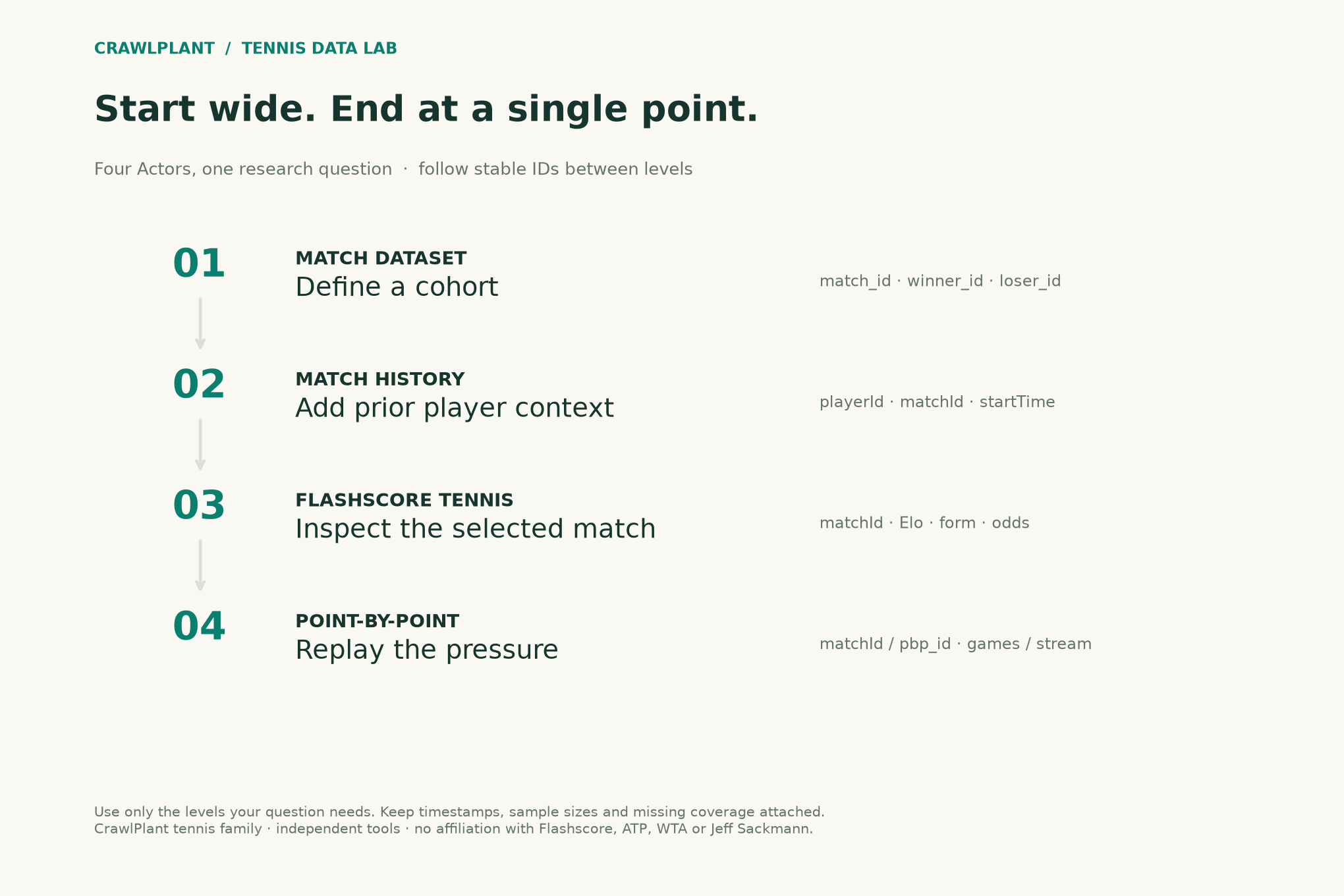
Here is a smaller workflow: use a match table to form a cohort, history to add context, a match lookup for richer fields, and point-by-point for the final investigation. The handoff is a match identifier, not a fuzzy comparison of names and dates.
Disclosure: I maintain these four CrawlPlant Actors. The numbers below come from saved Actor results retrieved on October 23, 2026. No new paid Actor runs were needed to make the illustrations.
Run this project: Get the code, sample data and finished outputs on GitHub. To fetch your own data, use the live recipe and follow the .env setup guide to add your APIFY_TOKEN. Actor calls can incur charges; the setup explains per-run limits. The live recipe joins the cohort and point streams; the project folder reproduces the complete saved report.
One question, four levels of detail
| Question | Actor | Identifier to keep |
|---|---|---|
| Which matches belong in the study? | ATP & WTA Match Dataset | match_id, winner_id, loser_id |
| What happened before the selected match? | Tennis Match History | matchId, player objects' playerId |
| What are the richer match fields? | Flashscore Tennis | matchId, startTime, scrapedAt |
| What happened inside the match? | Tennis Point-by-Point | matchId in games format; pbp_id in Sackmann format |
You do not need all four for every task. If a single enriched match row answers the question, stop there. The synergy is that you can move between levels when the next question needs it.
First measure how much you can actually join
The saved match batch contains 233 rows: 106 ATP and 127 WTA. A separate saved point-stream batch has 116 rows, all of which join to this match batch by ID. That means 49.8% of this cohort has points in this particular pair of exports.
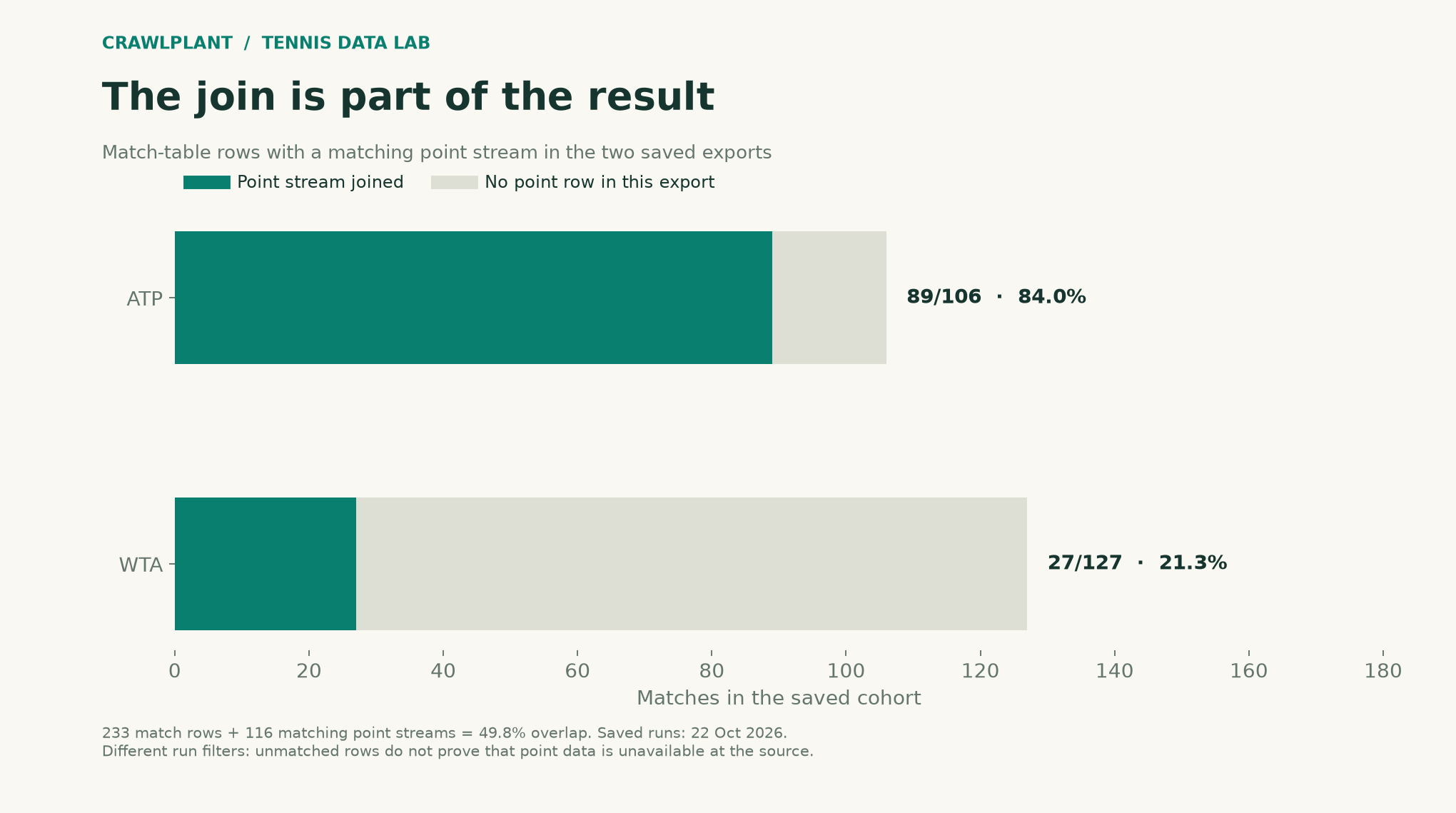
This is export-overlap coverage. The two runs used different selection rules, so the remaining rows cannot be called “matches for which the source has no points.” The result measures what this pair of files lets us study, not the product's overall point coverage.
That distinction changes the analysis. A pressure statistic calculated from the 116 joined matches describes the joined subset. It should not be labelled as a finding about all 233 matches without investigating what is missing.
Join identities and keep missingness
Install apify-client and set APIFY_TOKEN for new fetches. The helper checks run success and refuses to label a capped result complete. Calls can incur Apify charges; start with a short interval and set run spending limits in Apify.
import os
import json
import math
from pathlib import Path

def call_actor(slug, run_input):
    from apify_client import ApifyClient

    client = ApifyClient(os.environ["APIFY_TOKEN"])
    run = client.actor(f"crawlplant/{slug}").call(run_input=run_input)
    if not run or run["status"] != "SUCCEEDED":
        raise RuntimeError(f"Actor did not succeed: {run and run['status']}")
    rows = list(client.dataset(run["defaultDatasetId"]).iterate_items())
    if len(rows) >= run_input["maxItems"]:
        raise RuntimeError("Result reached maxItems; narrow the range or increase the cap before claiming completeness.")
    return rows
For a new study, request the same fixed date interval from both Actors:
matches = call_actor("tennis-match-dataset", {
    "years": [], "dateFrom": "2026-10-12", "dateTo": "2026-10-18",
    "tours": ["atp", "wta"], "maxItems": 2000,
})
points = call_actor("tennis-point-by-point", {
    "mode": "matches", "dateFrom": "2026-10-12", "dateTo": "2026-10-18",
    "tours": ["atp", "wta"], "pointByPointFormat": "sackmann",
    "maxItems": 2000,
})
The compact point stream uses S and R for server/returner points; A and D can distinguish aces and double faults where the format supplies them. For this step we only count recorded points, without inferring a momentum model or treating the starting server as the server throughout a tiebreak.
def join_points(matches, points):
    by_id = {}
    for row in points:
        key = row.get("pbp_id")
        if not key or key in by_id:
            raise ValueError("Point streams need unique pbp_id values")
        stream = row.get("pbp")
        if not isinstance(stream, str):
            raise ValueError("Expected a Sackmann point stream")
        unexpected = set(stream) - set("SRAD;./")
        if unexpected:
            raise ValueError(f"Unknown point symbols: {unexpected}")
        by_id[key] = row
    result = []
    for row in matches:
        point_row = by_id.get(row["match_id"])
        result.append({**row, "has_points": point_row is not None,
                       "recorded_points": sum(c in "SRAD" for c in point_row["pbp"]) if point_row else None})
    return result
joined = join_points(matches, points)
covered = sum(row["has_points"] for row in joined)
print(f"{covered}/{len(joined)} matches have point streams in these exports")
An absent point stream remains None, not zero. A duplicate pbp_id is an error to inspect, not an instruction to select a random copy.
Enrich only a shortlist
Select one completed match that has a recorded point stream. For a real research project, define the selection rule before interpreting its result; choosing a spectacular match after looking at all outcomes is a case study, not an unbiased sample.
eligible = [r for r in joined if r["has_points"] and
            not any(code in (r.get("score") or "") for code in ("RET", "W/O", "DEF"))]
if not eligible:
    raise ValueError("No eligible match in this export")
selected = eligible[0]
details = call_actor("flashscore-tennis", {
    "mode": "matchIds", "matchIds": [selected["match_id"]],
    "includeOdds": False, "includeH2H": True, "maxItems": 10,
})
if len(details) != 1 or details[0].get("matchId") != selected["match_id"]:
    raise ValueError("Expected the selected match")
match = details[0]
history = call_actor("tennis-match-history", {
    "playerUrls": [match["player1"]["url"]], "maxItems": 2000,
})
from datetime import datetime
cutoff = datetime.fromisoformat(match["startTime"].replace("Z", "+00:00"))
prior_history = [r for r in history if r.get("endTime") and r.get("status") == "finished"
                 and datetime.fromisoformat(r["endTime"].replace("Z", "+00:00")) < cutoff]
The career rows describe player one; use winner_id/loser_id or the returned player IDs if you want the winner's perspective. Never assume the first-listed player is the winner. Player two's career can be fetched separately if the research question needs it.
For the visual replay, request this same ID again from the point-by-point Actor with pointByPointFormat: "games", then apply the pressure-game analysis from the previous article.
Write a report that keeps its evidence
A useful output has a match ID and source URL, the cohort rule and size, the export overlap, the target match's start time, the retrieval timestamp, and a clear separation between pre-match context and events observed during the match.
An AI assistant can turn those facts into prose, but keep the facts as a structured attachment. Ask it to cite the fields it used and leave unknowns unknown. “Why the player won” is a causal story; a score, a rating and a pressure chart alone do not establish it.
The end result is a path a reader can follow: a broad table, a selected match, the players' prior records, and the games behind the score. Each Actor earns its place by answering the next question.
The finished report: follow the same match all the way
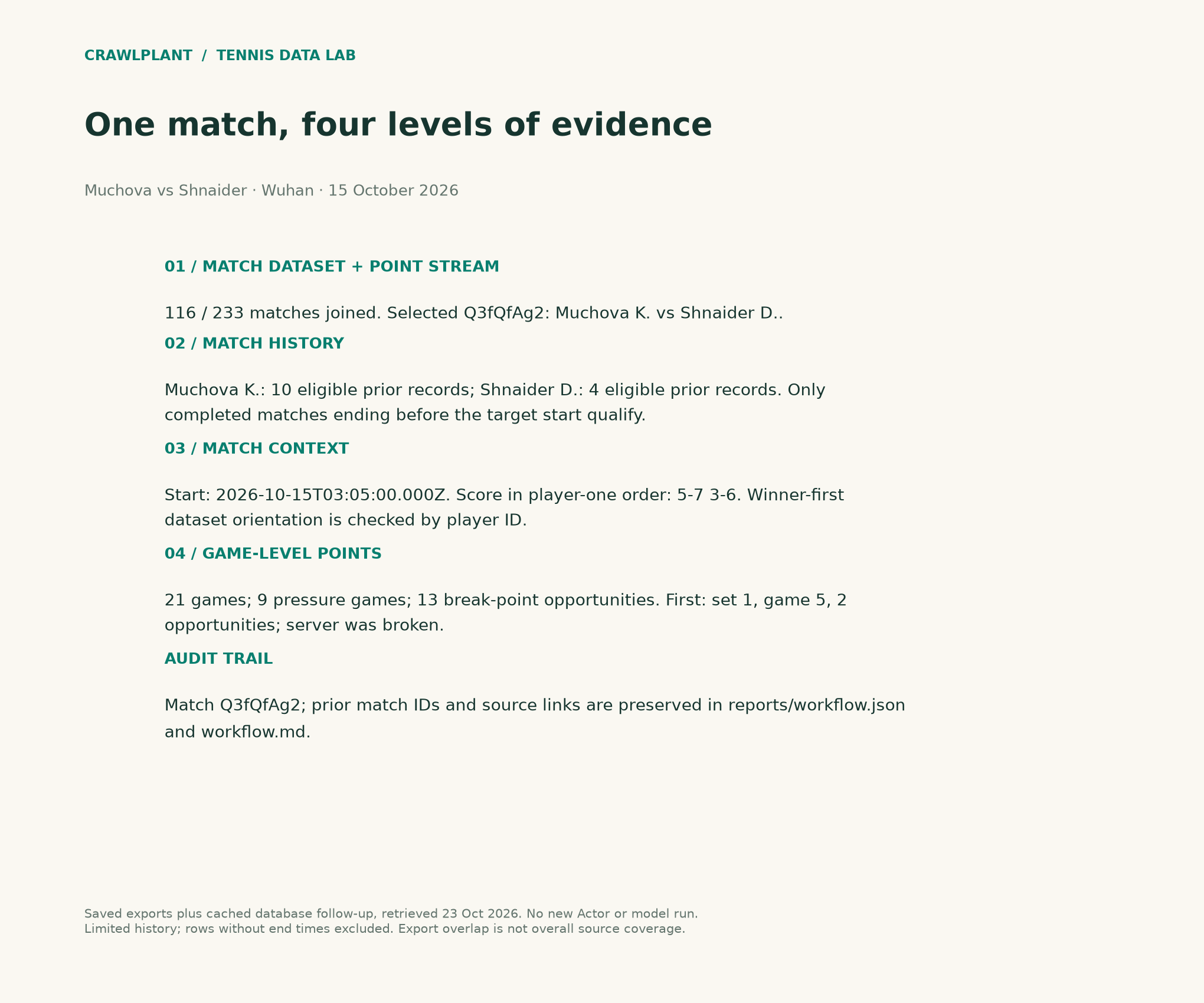
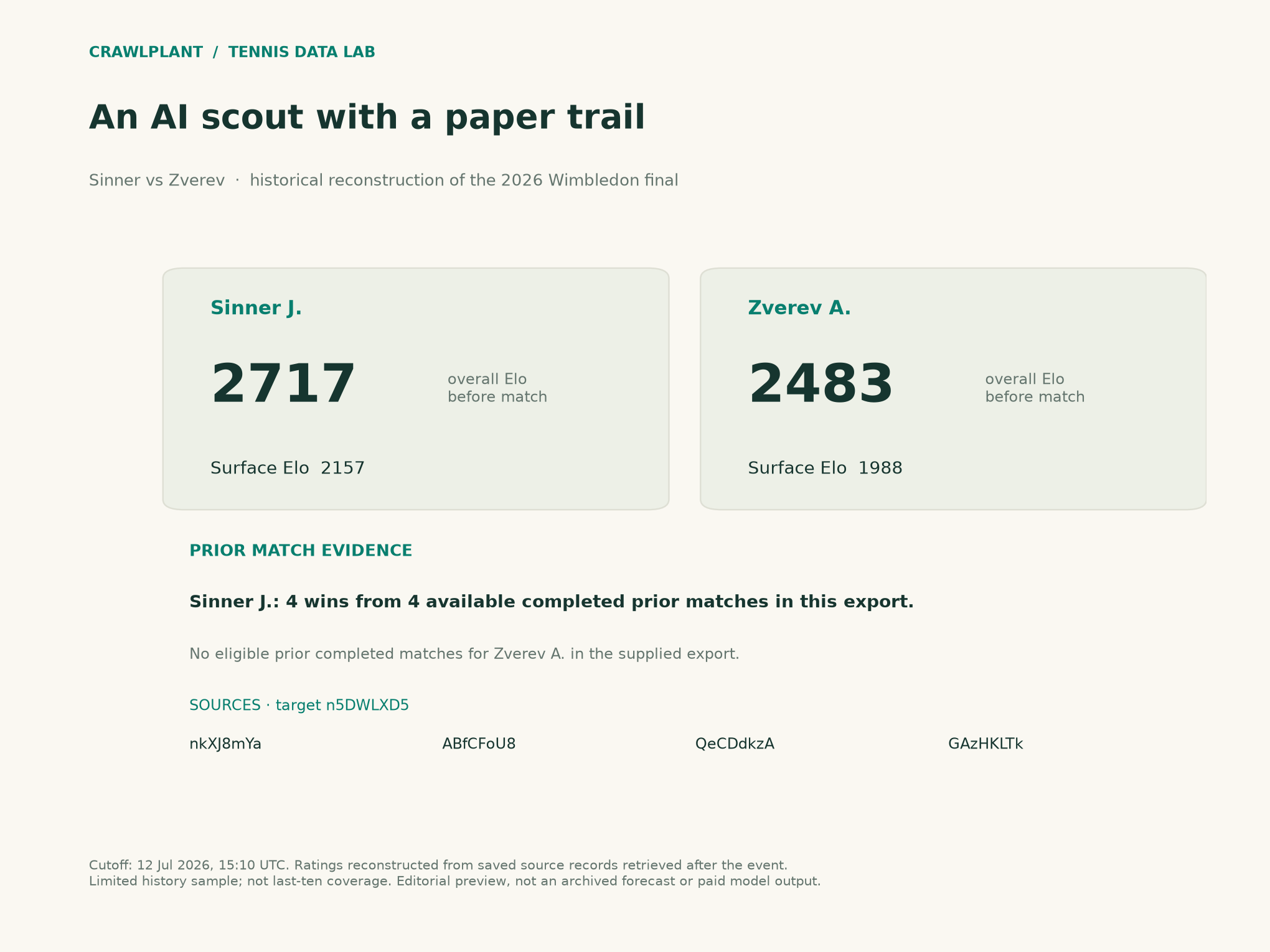
The saved cohort selects Q3fQfAg2, Muchová–Shnaider at Wuhan on October 15, 2026. It joins to a 159-point stream. A supplemental cached database read on October 23 supplies the context and game records for that same ID; it is not a new paid Actor run.
The final report records 21 games, nine pressure games and 13 break-point opportunities. The first pressure game is set one, game five: Muchová served, faced two break points and was broken. The history exports provide ten eligible prior records for Muchová and four for Shnaider after excluding the target, unfinished matches and missing end times. Those counts describe the available exports, not complete recent careers.
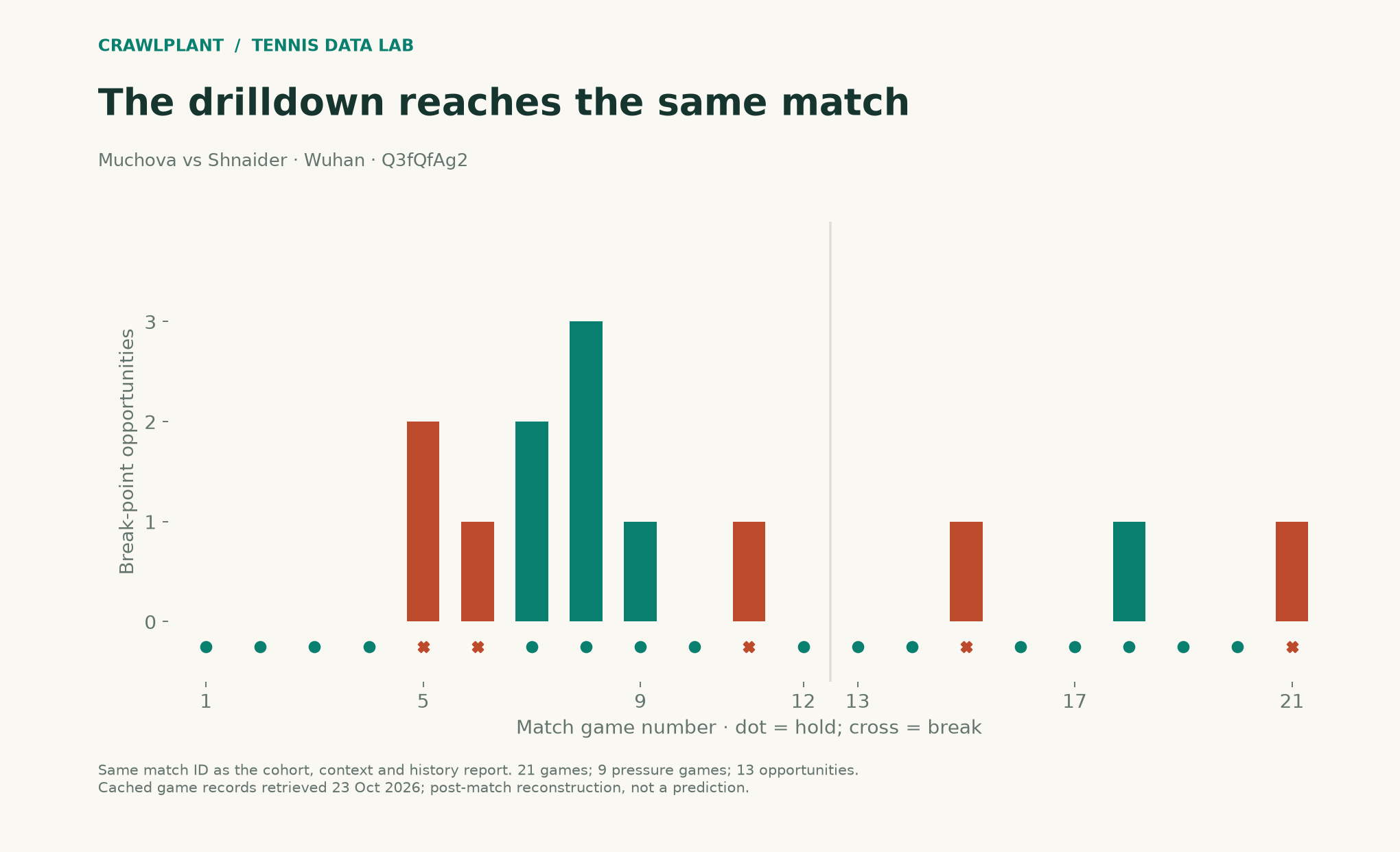
The companion exports this same-match timeline as assets/15-wuhan-pressure.png and .svg.
For a fresh run, complete the last handoff with the selected ID:
game_rows = call_actor("tennis-point-by-point", {
    "mode": "matchIds", "matchIds": [selected["match_id"]],
    "pointByPointFormat": "games", "maxItems": 10,
})
if len(game_rows) != 1 or game_rows[0].get("matchId") != selected["match_id"]:
    raise ValueError("Expected game-level data for the selected match")
game_match = game_rows[0]
service_games = [g for g in game_match.get("pointByPoint", [])
                 if not g.get("tiebreak") and g.get("server") in ("player1", "player2")]
if not service_games or any(g.get("breakPoints") is None for g in service_games):
    raise ValueError("Incomplete service-game pressure coverage")
pressure_games_found = [g for g in service_games if g["breakPoints"] > 0]
print("Pressure games:", len(pressure_games_found))
print("Break-point opportunities:", sum(g["breakPoints"] for g in pressure_games_found))
The companion's reports.py joins the original cohort and point streams, validates both participant IDs, filters history by end time before target start, and renders this card. reports/workflow.md contains the source links; .json preserves all eligible prior match IDs. The dataset is winner-oriented (Shnaider 7–5 6–3), while the context row is Muchová-first (5–7 3–6): both describe the same result.
Download and reproduce the example
Download the offline companion ZIP. Extract it, open a terminal in that folder and run:
python -m pip install -r requirements.txt
python render.py
The package includes the dated sample data, calculation functions, complete chart renderers and finished reports. It generates the series' charts and reports together; no API token or paid Actor/model call is required. The live-fetch code earlier in this article is a separate option and can produce different counts.
Inspect the sources: chart renderer, AI charts, report generation, and data notes. Both PNG and SVG outputs are written to assets/; reports go to reports/.
Keep building: Browse all 48 runnable examples, including Python, JavaScript and AI workflows across the CrawlPlant Actors.
Built with CrawlPlant's tennis Actors. Examples use dated source snapshots; fresh runs can return different results.
Explore the complete series →