
“Player A leads the head-to-head” sounds like a complete preview. It is usually the beginning of one.
Which surface? How many meetings? How recently? Were those normal completed matches, or did a retirement decide the result? A single career count compresses all of that into one confident-looking number.
Let's build a better rivalry card: wins by surface, the number of meetings alongside each comparison, and a separate place for current match context. We will use Sinner and Alcaraz as the example, but the workflow works for a WTA rivalry too.
Disclosure: I maintain CrawlPlant's tennis Actors. The examples use our independent data service, not an official ATP or WTA feed.
Run this project: Get the code, sample data and finished outputs on GitHub. To fetch your own data, use the live recipe and follow the .env setup guide to add your APIFY_TOKEN. Actor calls can incur charges; the setup explains per-run limits.
The visual we are aiming for
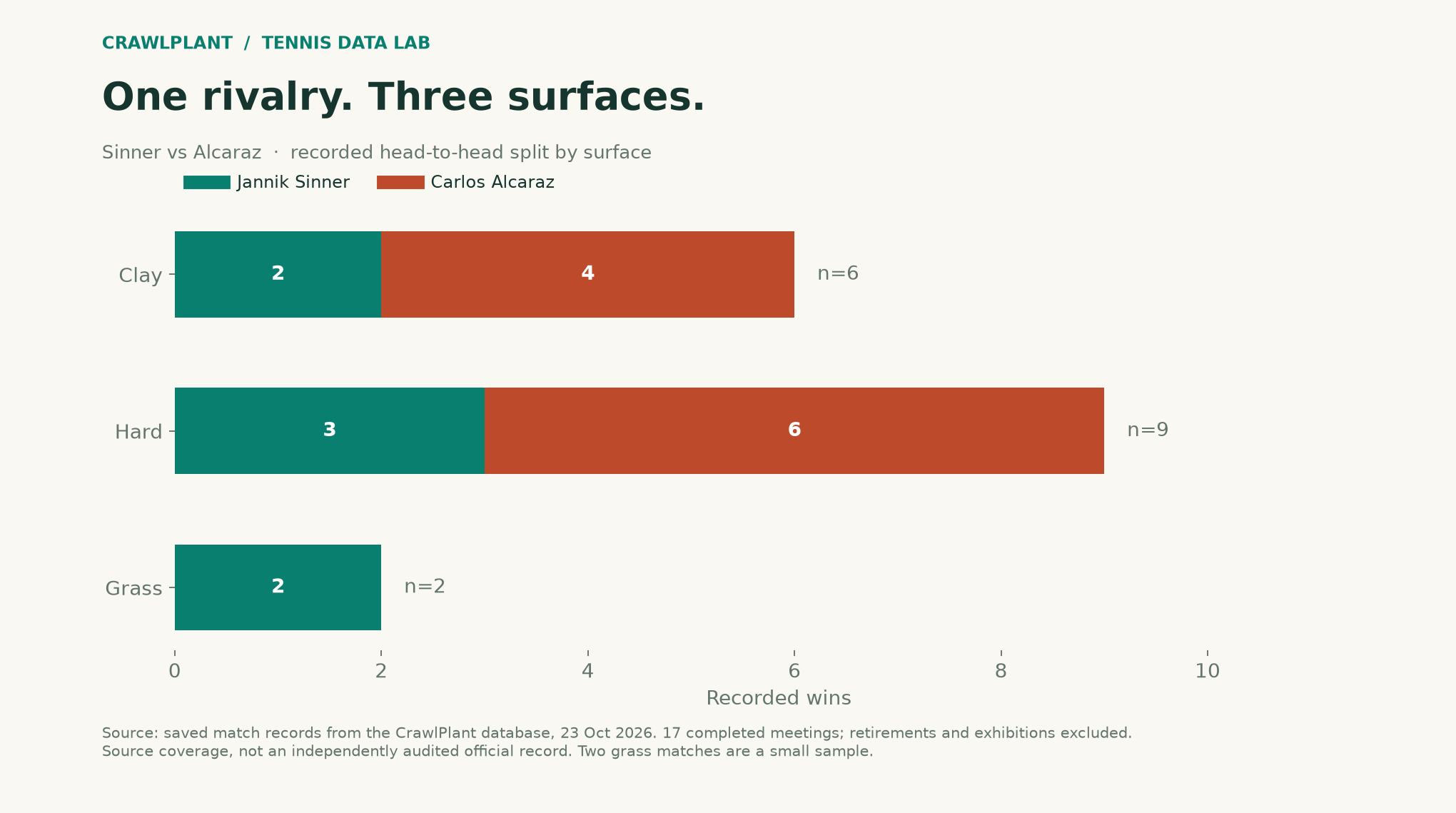
This is the completed-only CrawlPlant database sample retrieved on October 23, 2026: 17 completed meetings, split into nine on hard, six on clay and two on grass. It is a snapshot of this source's coverage, not an independently audited official head-to-head. The two grass meetings are especially important to label: two wins are interesting, but two matches do not establish a dependable forecasting rule.
The point of the chart is the change in context. A career total and a surface-specific total answer different questions.
Retrieve the rivalry as individual matches
Install apify-client, set APIFY_TOKEN, and use this helper. It retrieves every dataset page and refuses to treat a capped result as a complete history. Actor calls are paid according to the Store listing; set a spending limit in Apify before a large request.
import os
import json
import math
from pathlib import Path

def call_actor(slug, run_input):
    from apify_client import ApifyClient

    client = ApifyClient(os.environ["APIFY_TOKEN"])
    run = client.actor(f"crawlplant/{slug}").call(run_input=run_input)
    if not run or run["status"] != "SUCCEEDED":
        raise RuntimeError(f"Actor did not succeed: {run and run['status']}")
    rows = list(client.dataset(run["defaultDatasetId"]).iterate_items())
    if len(rows) >= run_input["maxItems"]:
        raise RuntimeError("Result reached maxItems; narrow the range or increase the cap before claiming completeness.")
    return rows
rows = call_actor("tennis-match-history", {
    "playerUrls": ["https://www.flashscore.com/player/sinner-jannik/6HdC3z4H/"],
    "players": ["Alcaraz"],
    "status": "finished",
    "tours": ["atp", "challenger-men", "itf-men"],
    "maxItems": 200,
})
The player URL fixes the first identity. The opponent filter is a name-contains search, so inspect the returned opponents before publishing a named rivalry. For a production report, verify the second player's playerId too. A short surname is convenient input, not a globally unique key.
Avoid the home-player trap
Tennis does not have a home side. player1 is the first player in that source record; the same person may be player2 in the next meeting.
This aggregation finds Sinner by ID for every match, drops duplicate match IDs, and counts only completed matches with a recorded winner:
def rivalry_by_surface(rows, player_id):
    totals = {}
    seen = set()
    for row in rows:
        if row.get("status") != "finished" or row.get("winner") not in ("player1", "player2"):
            continue
        if row["matchId"] in seen:
            continue
        seen.add(row["matchId"])
        side = next((s for s in ("player1", "player2") if (row.get(s) or {}).get("playerId") == player_id), None)
        if side is None:
            raise ValueError("The chosen player is absent from a returned match")
        surface = row.get("surface") or "unknown"
        total = totals.setdefault(surface, {"wins": 0, "losses": 0})
        total["wins" if row["winner"] == side else "losses"] += 1
    return totals
card = rivalry_by_surface(rows, "6HdC3z4H")
for surface, record in card.items():
    n = record["wins"] + record["losses"]
    print(surface, f"{record['wins']}-{record['losses']}", f"n={n}")
An unknown surface remains an explicit group. It does not silently become hard court. Retirements and walkovers are excluded from this particular analysis; an official head-to-head may use a different inclusion rule. State the rule near the chart rather than expecting readers to infer it.
Add today's context through the main Actor
A rivalry table describes their meetings. A preview also needs the conditions of the next match: scheduled time, surface, form, rest days and ratings.
context = call_actor("flashscore-tennis", {
    "mode": "matches",
    "dateFrom": "tomorrow",
    "players": ["Sinner"],
    "tours": ["atp"],
    "status": "scheduled",
    "includeOdds": False,
    "includeH2H": True,
    "maxItems": 50,
})

for match in context:
    print(match["matchId"], match["player1Name"], match["player2Name"],
          match.get("surface"), match.get("form"))
There may be no scheduled match tomorrow, or it may be against someone else. Check both player IDs before attaching this context to a rivalry card. “No scheduled match returned” is a valid report outcome.
For a historical preview, filter the rivalry rows to dates before the target match, and use that match's stored pre-match fields. Today's career record would include results the historical preview could not have known.
Make the card useful to a reader
Show the surface record, its sample size and the last few actual meetings. Put a timestamp on current form. Leave an unavailable field blank with a clear label. Avoid a single “confidence score” that mixes all of those quantities without a model behind it.
The two Actors have distinct jobs here: Tennis Match History supplies the auditable list of meetings, while Flashscore Tennis supplies the match context. If one row from that list deserves a closer look, its matchId is the handoff to the point-by-point Actor.
That gives you a rivalry card a reader can question and inspect, instead of a number they simply have to trust.
Put the meetings behind the card
The completed-only calculation gives Sinner a 3–6 hard-court record, 2–4 on clay and 2–0 on grass in the saved coverage. Here are the latest three eligible meetings; scores below are in the winner's order:
| Date | Event | Winner | Score | Source |
|---|---|---|---|---|
| 2026-04-12 | Monte Carlo | Sinner | 7–6(5) 6–3 | 6ye8F0kT |
| 2025-11-16 | Finals – Turin | Sinner | 7–6(4) 7–5 | SGeB5San |
| 2025-09-07 | US Open | Alcaraz | 6–2 3–6 6–1 6–4 | 4EAVYPi5 |
Scheduled context: not fetched in the offline example. The live lookup above is a separate step, and may return no match. We do not attach today's form to a historical meeting.
The companion generates the surface chart from the individual records, and exports reports/rivalry.md and .json with the recent meetings and their links. Its completed-only filter excludes the retirement that was present in the earlier 18-match aggregate, leaving 17 meetings: nine hard, six clay, two grass. Exhibitions are excluded too.
Download and reproduce the example
Download the offline companion ZIP. Extract it, open a terminal in that folder and run:
python -m pip install -r requirements.txt
python render.py
The package includes the dated sample data, calculation functions, complete chart renderers and finished reports. It generates the series' charts and reports together; no API token or paid Actor/model call is required. The live-fetch code earlier in this article is a separate option and can produce different counts.
Inspect the sources: chart renderer, AI charts, report generation, and data notes. Both PNG and SVG outputs are written to assets/; reports go to reports/.
Keep building: Browse all 48 runnable examples, including Python, JavaScript and AI workflows across the CrawlPlant Actors.
Built with CrawlPlant's tennis Actors. Examples use dated source snapshots; fresh runs can return different results.
Explore the complete series →