
The first useful result from a tennis prediction project is not necessarily a clever forecast. It may be discovering that your learned model is worse than the rating you already had.
This tutorial builds a very small logistic model using one input: the difference between two players' pre-match overall Elo. It compares that fitted model with a 50/50 prediction and the ordinary Elo probability formula. There is no language model guessing the winner from a player's name.
The interesting work is constructing the table correctly and deciding what the experiment can claim.
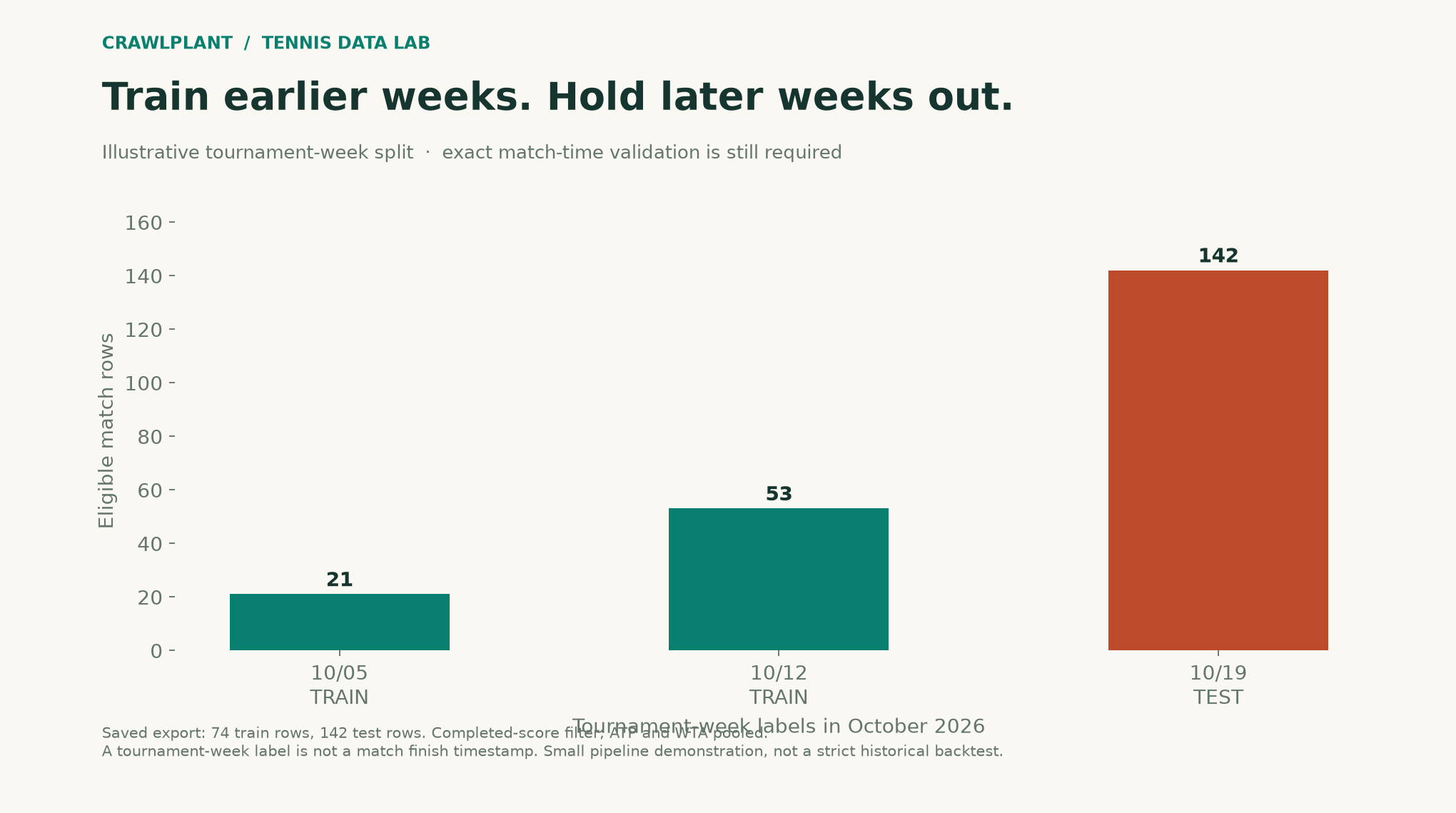
Disclosure: I maintain the CrawlPlant Actors used here. The illustrated experiment uses an existing 233-match export, not a full season. It is a pipeline demonstration with 74 eligible training rows and 142 later-week test rows, not evidence of a deployable forecasting advantage.
Run this project: Get the code, sample data and finished outputs on GitHub. To fetch your own data, use the live recipe and follow the .env setup guide to add your APIFY_TOKEN. Actor calls can incur charges; the setup explains per-run limits. The live recipe downloads a dataset; the project folder contains the reproducible baseline model and evaluation.
The first trap: every row starts with the winner
The dataset has winner_elo, loser_elo, winner_id and loser_id. If you use those columns to define “player A” as the winner, every label becomes one. An apparently excellent classifier would just be reading the answer from your table layout.
Instead, assign A and B by a rule available before the result: lexical order of their stable player IDs. Those IDs choose orientation only; they are not model features. A may then win or lose, and the Elo difference is consistently A minus B.
Install apify-client and scikit-learn, then set APIFY_TOKEN. Actor calls can incur charges; use a spending limit. For a larger study, fetch complete earlier seasons for training and a later period for evaluation. This small fixed window is enough to exercise the example:
import os
import json
import math
from pathlib import Path
from datetime import datetime
from urllib.request import Request, urlopen

def call_actor(slug, run_input):
    from apify_client import ApifyClient

    client = ApifyClient(os.environ["APIFY_TOKEN"])
    run = client.actor(f"crawlplant/{slug}").call(run_input=run_input)
    if not run or run["status"] != "SUCCEEDED":
        raise RuntimeError(f"Actor did not succeed: {run and run['status']}")
    rows = list(client.dataset(run["defaultDatasetId"]).iterate_items())
    if len(rows) >= run_input["maxItems"]:
        raise RuntimeError("Result reached maxItems; narrow the range or increase the cap before claiming completeness.")
    return rows
rows = call_actor("tennis-match-dataset", {
    "years": [], "dateFrom": "2026-10-01", "dateTo": "2026-10-22",
    "tours": ["atp", "wta"], "maxItems": 5000,
})
The illustration uses the saved incremental export rather than that fresh calendar request. Its counts and scores are not promised outputs of a future run.
def model_rows(rows):
    result, seen = [], set()
    for row in rows:
        key = row["match_id"]
        if key in seen:
            raise ValueError("Duplicate match ID in modelling sample")
        seen.add(key)
        if any(c in (row.get("score") or "") for c in ("RET", "W/O", "DEF")):
            continue
        w, l = row.get("winner_elo"), row.get("loser_elo")
        if w is None or l is None or not all(isinstance(v, (int, float)) and math.isfinite(v) for v in (w,l)):
            continue
        if not row.get("winner_id") or not row.get("loser_id") or row["winner_id"] == row["loser_id"]:
            raise ValueError("Two distinct participant IDs are required")
        # Participant ordering must be possible before the match result is known.
        winner_is_a = str(row["winner_id"]) < str(row["loser_id"])
        gap = (w-l) if winner_is_a else (l-w)
        result.append({"match_id": key, "week": row["tourney_date"], "tour": row["tour"], "gap": gap/400,
                       "a_won": int(winner_is_a), "elo_probability": 1/(1+10**(-gap/400))})
    return result
We exclude retirement, walkover and default scores and require both Elo values. Duplicate match IDs stop the calculation. The target match's aces, duration, final score and winner-oriented field order are not prediction features.
Keep later tournament weeks out of training
Here the final holdout starts at tournament-week label 20261019; earlier labels train the model. The regularization and model form are fixed in advance in this example.
def fit_temporal_baseline(rows, cutoff_week=20261019):
    from sklearn.linear_model import LogisticRegression
    from sklearn.metrics import brier_score_loss, log_loss

    data = model_rows(rows)
    train = [r for r in data if r["week"] < cutoff_week]
    test = [r for r in data if r["week"] >= cutoff_week]
    if len(train) < 10 or len(test) < 10 or len({r["a_won"] for r in train}) != 2:
        raise ValueError("Need earlier training data, later test data and both training classes")
    model = LogisticRegression(fit_intercept=False, C=1.0, max_iter=1000)
    model.fit([[r["gap"]] for r in train], [r["a_won"] for r in train])
    labels = [r["a_won"] for r in test]
    predictions = {"50/50": [.5]*len(test), "Overall Elo": [r["elo_probability"] for r in test],
                   "Fitted logistic": model.predict_proba([[r["gap"]] for r in test])[:,1].tolist()}
    scores = {name: {"brier": float(brier_score_loss(labels,p)), "log_loss": float(log_loss(labels,p,labels=[0,1]))} for name,p in predictions.items()}
    return {"train_count": len(train), "test_count": len(test), "cutoff_week": cutoff_week,
            "scores": scores, "test": test, "predictions": predictions}
evaluation = fit_temporal_baseline(rows, cutoff_week=20261019)
print("Train:", evaluation["train_count"], "Test:", evaluation["test_count"])
for name, scores in evaluation["scores"].items():
    print(name, f"Brier={scores['brier']:.4f}", f"log loss={scores['log_loss']:.4f}")
tourney_date is a tournament-week label, not the timestamp at which an individual match finished. This split holds out later labelled weeks, but cannot on its own prove strict time-of-availability. Before making a real chronological backtest claim, join exact match times from another Actor, verify that training matches ended before the cutoff, and archive the features as they were known then.
The sample pools ATP and WTA. That is convenient for exercising the pipeline, not a reason to assume that one fitted calibration is appropriate for both populations. Evaluate them separately on a larger cohort before drawing tour-specific conclusions.
Show the result even when it is inconvenient
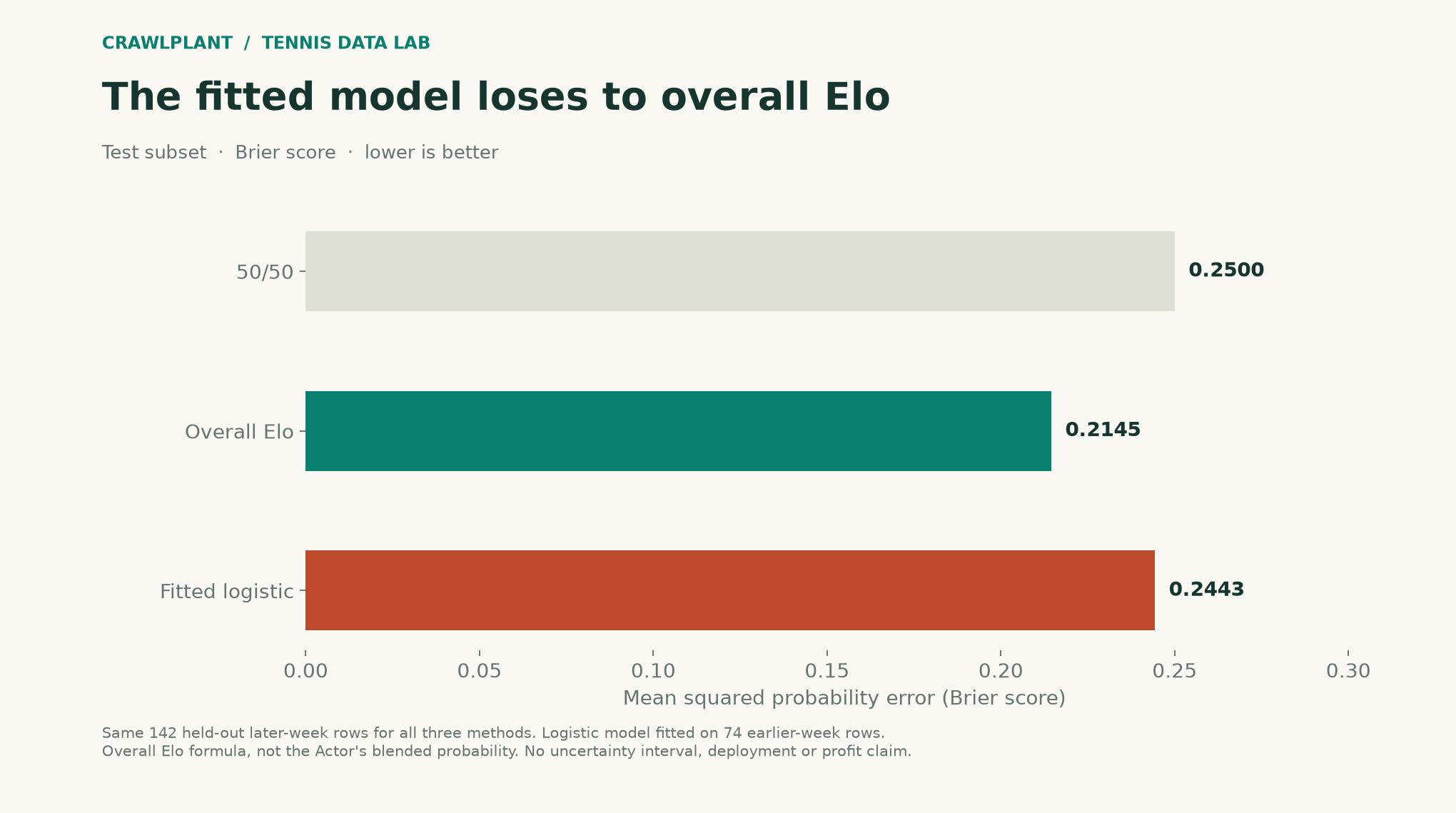
In the saved sample, overall Elo has a Brier score of 0.2145, the fitted logistic model 0.2443, and the 50/50 baseline 0.2500. The fitted model loses to overall Elo on this test subset. No parameters were changed after that result to make the example look better.
Brier score is the mean squared difference between predicted probability and outcome; lower is better. Log loss is also reported. See scikit-learn's probability-scoring documentation and the logistic regression reference. The experiment is too small for a reliable performance claim; no confidence interval or profitability estimate is implied.
The overall Elo baseline here is 1 / (1 + 10 ** (-elo_gap / 400)). It is not the Actor's potentially blended overall-and-surface match probability. Comparing the two under one label would hide a meaningful modelling difference.
Where the other Actors become useful
The match dataset supplies the training table. Tennis Match History supplies exact start and end times and the prior results needed for additional features. Flashscore Tennis can supply match-level surface Elo, form and stored pre-match probability for a matched-ID comparison.
Join by match_id to matchId. For each proposed feature, document its observation time. A target match's completed point sequence is an outcome to investigate, not a feature available before play. Point-by-point from genuinely earlier matches could support later research, but it needs the same cutoff discipline.
Freeze the next training, validation and test windows before adding features. Keep an untouched later period. The useful end product is a reproducible experiment that can tell you to keep the simpler model, not an AI label attached to a spreadsheet that already contains the answer.
Export the experiment, including the losing result
The companion regenerates both illustrations from the saved rows: assets/11-ml-week-split.png and assets/12-ml-baselines.png, with SVG copies. It also exports reports/model-evaluation.json and reports/model-predictions.csv so every held-out probability can be inspected.
import csv
Path("model-evaluation.json").write_text(json.dumps(evaluation, indent=2), encoding="utf-8")
with Path("model-predictions.csv").open("w", newline="", encoding="utf-8") as handle:
    writer = csv.writer(handle)
    writer.writerow(["match_id", "a_won", *evaluation["predictions"]])
    for i, row in enumerate(evaluation["test"]):
        writer.writerow([row["match_id"], row["a_won"],
                         *[p[i] for p in evaluation["predictions"].values()]])
All three methods have 142 predictions on the same held-out rows. This makes the comparison auditable without presenting the small pooled sample as a production model.
Download and reproduce the example
Download the offline companion ZIP. Extract it, open a terminal in that folder and run:
python -m pip install -r requirements.txt
python render.py
The package includes the dated sample data, calculation functions, complete chart renderers and finished reports. It generates the series' charts and reports together; no API token or paid Actor/model call is required. The live-fetch code earlier in this article is a separate option and can produce different counts.
Inspect the sources: chart renderer, AI charts, report generation, and data notes. Both PNG and SVG outputs are written to assets/; reports go to reports/.
Keep building: Browse all 48 runnable examples, including Python, JavaScript and AI workflows across the CrawlPlant Actors.
Built with CrawlPlant's tennis Actors. Examples use dated source snapshots; fresh runs can return different results.
Explore the complete series →